
Download ClarityPage – AI‑Powered Balanced News Aggregator for Free, Secure Updates
Overview of ClarityPage
ClarityPage is an AI‑driven news aggregator that tackles the growing problem of echo‑chambers in today’s media landscape. By pulling stories from a broad spectrum of outlets—including left‑leaning, right‑leaning, and centrist sources—ClarityPage delivers a single, unbiased snapshot of the day’s most important events. The platform’s core promise is to surface both the dominant headlines that dominate a particular political narrative and the quieter stories that often slip beneath the radar.
Leveraging state‑of‑the‑art natural‑language processing and sentiment analysis, ClarityPage automatically condenses each article into concise, easy‑to‑read summaries while preserving the original context and nuance. Real‑time updates keep the feed fresh, and a weekly roundup email highlights the most significant developments of the past seven days, making it an essential tool for anyone who wants to stay informed without being overwhelmed by partisan noise. Whether you’re a busy professional juggling multiple projects, a student tracking policy trends, a researcher needing a balanced literature base, or a casual reader who values comprehensive coverage, ClarityPage is designed to become your go‑to source for unbiased, comprehensive news.
Its privacy‑first architecture ensures that your reading habits remain confidential, and the free tier provides full access to the core features, so you can experience balanced journalism without a subscription barrier.
Key Features That Set ClarityPage Apart
ClarityPage differentiates itself from generic news apps through a combination of AI intelligence, transparency, and customization. Every feature has been built with the goal of providing a clear, unbiased view of current events while keeping the user experience smooth and secure. Below is a detailed look at what makes the platform stand out:
- Multi‑Perspective Aggregation: Pulls articles from over 150 vetted sources spanning the entire political spectrum, guaranteeing that every major viewpoint is represented in the feed.
- AI‑Generated Summaries: Advanced language models distill long‑form pieces into 2‑3 sentence briefs that retain essential facts, tone, and nuance, saving users valuable time.
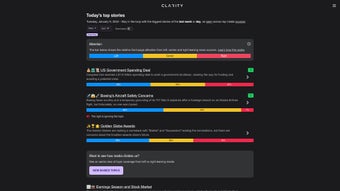
- Coverage Comparison Dashboard: Interactive visual charts compare how different outlets prioritize the same story, exposing media bias in real time and allowing readers to see divergent framing at a glance.
- Overlooked Story Highlight: The algorithm flags stories that receive minimal coverage on one side but are widely reported on the other, bringing hidden angles to the surface and encouraging deeper investigation.
- Weekly News Round‑Up: Every Sunday, users receive a curated email summarizing the week’s most impactful stories across all categories, complete with AI‑generated insights.
- Customizable Feed: Users can filter by topics such as climate, elections, technology, health, and foreign affairs, and set preferred political leanings to tailor the flow of information.
- Secure, Privacy‑First Design: No tracking cookies, end‑to‑end encrypted data storage, and optional anonymous browsing protect user privacy while complying with GDPR and CCPA standards.
- Cross‑Platform Sync: Seamlessly switch between desktop browsers, native Windows/macOS apps, and mobile iOS/Android applications while keeping your reading history, bookmarks, and preferences synced in real time.
- Ad‑Free Premium Option: While the free tier includes a modest, non‑intrusive banner ad, a paid subscription removes ads entirely and unlocks advanced sentiment analytics for power users.
Installation, Usage & Compatibility
Getting started with ClarityPage is straightforward, whether you prefer a web‑based experience, a desktop client, or a native mobile app. The following step‑by‑step guide walks you through downloading, installing, and configuring the software on all major platforms, ensuring a smooth onboarding process for new users.
Desktop (Windows, macOS, Linux)
- Visit the official ClarityPage website and click the Download for Windows or Download for macOS button. Linux users can access the web version directly from any modern browser.
- Run the installer (.exe for Windows, .dmg for macOS). The wizard guides you through standard installation steps, including license agreement acceptance and destination folder selection.
- After installation, launch the application. The first‑time startup screen prompts you to create a free account using an email address or a single‑sign‑on option (Google, Apple ID, or Microsoft). No credit card is required for the free tier.
- Complete the onboarding wizard, which asks about your primary interests (e.g., politics, science, technology) and your desired balance of political perspectives. This information fine‑tunes the AI’s article selection and bias‑tagging algorithms.
- Enable automatic updates in the Settings menu to ensure you receive the latest security patches and feature enhancements without manual intervention.
Mobile (iOS & Android)
- Open the Apple App Store or Google Play Store, search for “ClarityPage,” and tap Install. The app is lightweight, typically under 50 MB, and requires minimal storage.
- Grant permission for push notifications if you wish to receive real‑time alerts for breaking stories or the weekly roundup email.
- Log in using the same credentials created on the desktop version. Cloud sync automatically imports your saved articles, filters, and reading history.
- Navigate the mobile interface, which mirrors the desktop layout with three primary tabs: Top Stories, Comparison, and My Feed. Swipe gestures enable quick switching between tabs.
- Adjust notification preferences and data usage settings in the app’s Settings to optimize performance on limited data plans.
ClarityPage is compatible with Windows 10/11, macOS 10.15+ (Catalina), iOS 13+, Android 8.0+, and most modern Linux distributions via a web browser, ensuring a seamless experience across desktops, laptops, tablets, and smartphones.
Once logged in, the home screen presents a clean, minimalist design with a white background and soft accent colors to reduce eye strain. Each headline includes a concise AI‑generated summary, a bias indicator icon (left, center, right), and a quick‑view button that opens a side‑by‑side comparison of excerpts from multiple sources. The Comparison tab hosts the visual dashboard, while My Feed reflects your personalized filters, saved articles, and bookmarked topics. The interface is optimized for both mouse and touch navigation, making it equally comfortable on a desktop monitor or a mobile screen.
Pros, Cons & Frequently Asked Questions
Pros
- Delivers truly balanced coverage by aggregating left, center, and right sources.
- AI‑generated summaries save time without sacrificing nuance or factual accuracy.
- Coverage comparison charts make media bias visible at a glance, fostering critical thinking.
- Weekly roundup email helps busy users stay up‑to‑date with a concise digest.
- Free tier includes all core functionalities; premium add‑ons are optional and non‑essential.
- Privacy‑first architecture with no tracking cookies and end‑to‑end encryption.
- Cross‑device synchronization keeps your feed consistent across Windows, macOS, iOS, and Android.
- Responsive customer support and an active community forum for feature suggestions.
- Regular updates improve AI accuracy and expand source libraries.
Cons
- Limited number of sources in niche categories such as local community news or specialized industry publications.
- AI summaries may occasionally miss subtle editorial tones or sarcasm, requiring a quick glance at the full article for full context.
- Free version includes a modest, non‑intrusive banner ad that some users may find distracting.
- Desktop app on macOS occasionally requires manual updates for major version changes.
- Advanced analytics, such as deep sentiment breakdowns and historical bias trends, are locked behind a premium subscription.
- Initial onboarding can feel extensive for users who simply want a quick news glance.
FAQ – Your Questions Answered
Is ClarityPage really free to use?
Yes. The core aggregator, AI summaries, and weekly roundup are completely free. A small, non‑intrusive banner ad appears in the free version, and a premium subscription removes ads and unlocks deeper analytics.
How does ClarityPage ensure unbiased coverage?
The platform pulls articles from over 150 vetted sources spanning the political spectrum. Its AI then tags each source’s known bias and displays stories side‑by‑side, allowing users to see how the same event is framed differently.
Can I customize the topics I see?
Absolutely. During onboarding you can select categories such as politics, science, technology, health, and foreign affairs. You can later adjust these preferences in the Settings menu, and even create custom topic groups.
Is my data safe with ClarityPage?
ClarityPage uses end‑to‑end encryption for all user data, does not sell personal information to third parties, and complies with GDPR and CCPA regulations, ensuring that your reading habits remain private.
How often is the news feed refreshed?
The aggregator updates every five minutes, ensuring you receive the latest headlines as soon as they appear across the selected sources.
Do I need an internet connection to read saved articles?
Yes, because articles are streamed in real time from the source websites. However, you can use the “Save for Offline” feature on mobile to download a limited number of articles for later reading without a connection.
Conclusion & Call to Action
ClarityPage fills a crucial gap in the crowded news‑app market by marrying AI efficiency with genuine multi‑perspective journalism. Its intuitive interface, robust source library, transparent bias indicators, and privacy‑first design empower readers to make informed decisions without being steered toward a single narrative. While the free tier already offers a remarkable amount of value, power users may appreciate the optional premium upgrade for ad‑free browsing and deeper sentiment analytics. Overall, the platform succeeds in its mission to provide a balanced, unbiased snapshot of current events, making it an indispensable tool for anyone who cares about truth over echo‑chamber reinforcement.
Ready to experience a clearer view of the world? Free USD Download ClarityPage today and start your journey toward more balanced news consumption.



.png)



